

To begin with, let us discuss the present scenario of app development. You think of a particular flow of screens and you take paper, neatly draw it on a piece of paper and keep it as a reference for discussion with your team.
The problem peeps in when after the discussion you want to alter some flow or add/delete new screens.
Now very patiently you would strike off few connections and reconstruct some new. But after a couple of few such changes, you have to either redraw the complete thing on a new paper or manage with the scribbled paper.
Solution-
On CanvasFlip we have the feature of UX SITEMAP.
- This sitemap shows the complete picture of the flow.
- The best part of this is that any changes you make on the flow get automatically reflected on the sitemap.
- You can share the app via gmail or directly take a printout or view it on live CanvasFlip tool for discussions with your team.
Check out this preview:
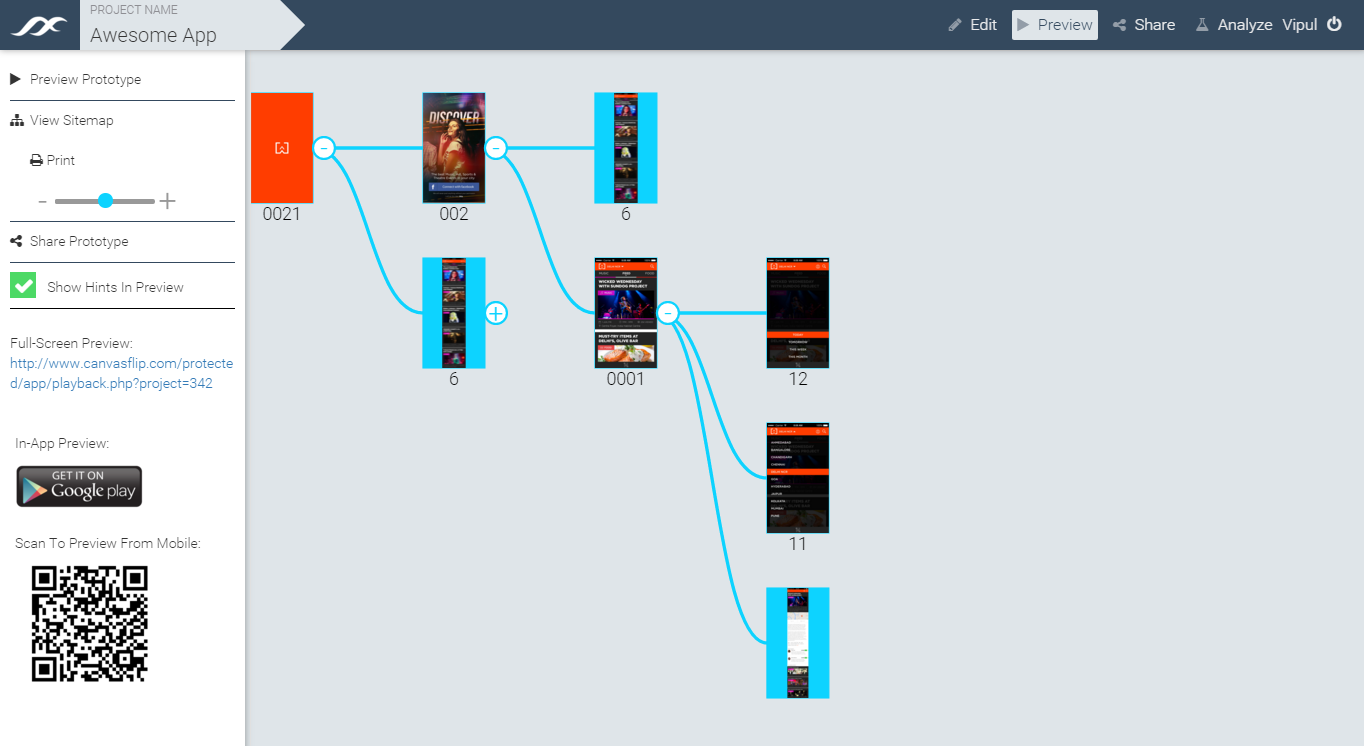 (CanvasFlip-Automatic UX Sitemap Preview)
There just two simple steps which you need to follow-
- On the top right hand side of the screen, you would find a PREVIEW button. Click on it
- On the left hand section you would now find VIEW SITEMAP. Click on it to view your app flow.
(CanvasFlip- Automatic UX Sitemap Demo)